Visual regression testing your coding agent can run itself
No test code, no Storybook — just a verdict your agent or CI can act on.
- Live vs live
- Scheduled checks
- Managed baselines
No credit card required • Start your 7-day free trial today
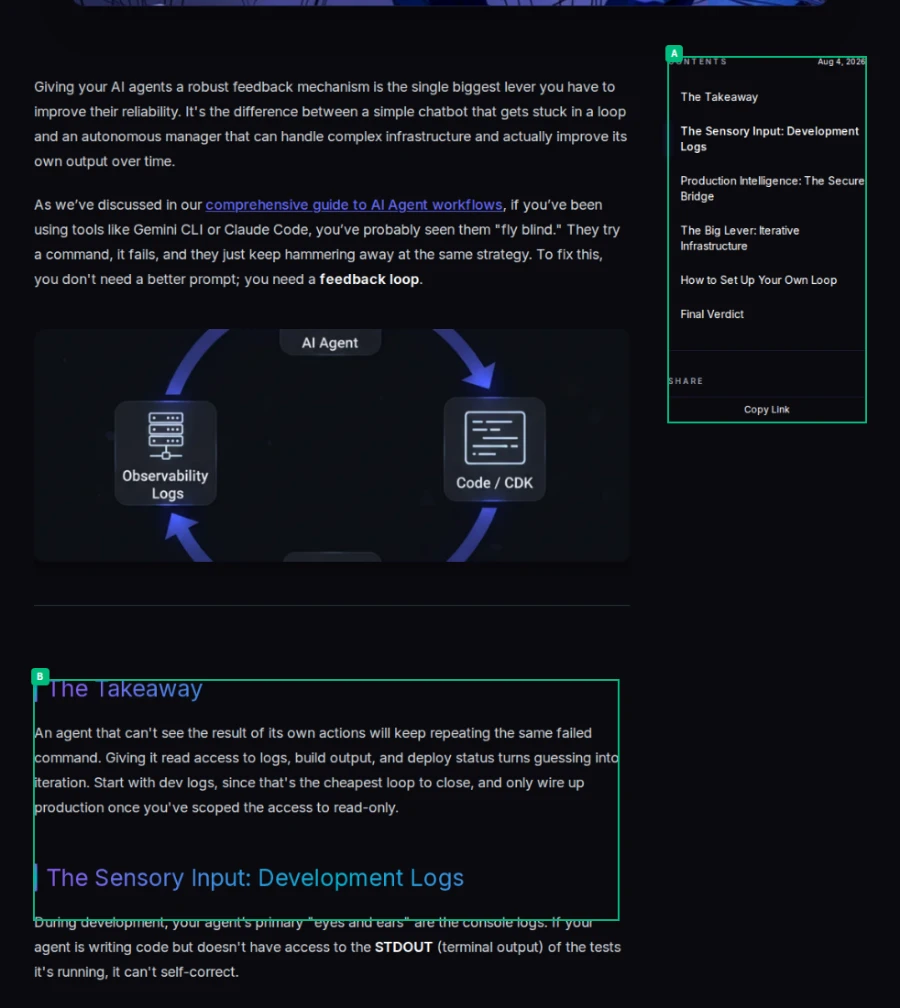
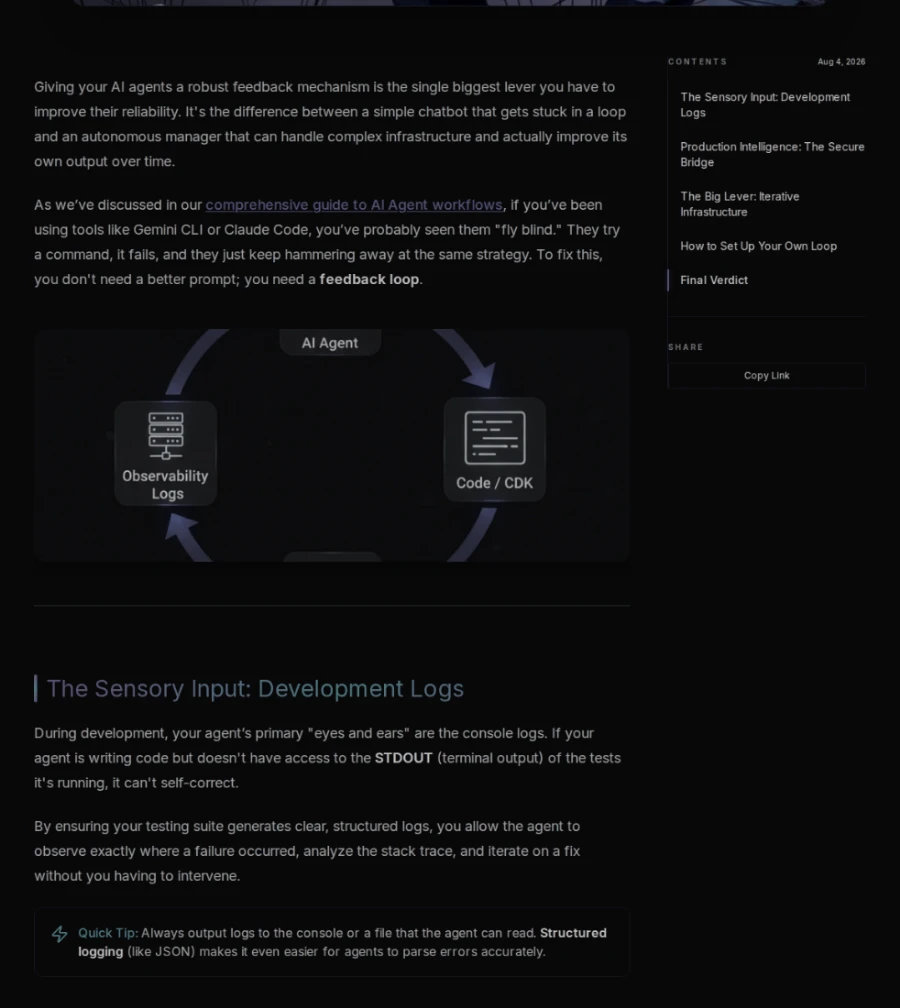
“A new ‘The Takeaway’ summary section was inserted above ‘The Sensory Input: Development Logs’, pushing all subsequent content down.”
“The table of contents gained a new ‘The Takeaway’ entry at the top, shifting all other entries down slightly.”
Real output — two of the three regions found on this page are in frame. Drag to compare.
Stop squinting at red pixels.
When a layout changes, RegressionBot doesn't just throw a broken test and a red box at you. It uses vision models to understand the DOM and explain exactly what changed—and whether it matches your intent.
Changes detected:
- The hero icon was updated from a square to a checkmark (A).
- A new "Admin Dashboard" navigation item was added to the sidebar (B).
- Text phrasing in the configuration paragraph was modified (C, D).
- A new "Project Configuration Locking" section was inserted (E).
- The active state indicator in the Table of Contents was shifted (F).
✓ These changes match the provided PR description: "Add Admin Dashboard to sidebar and document configuration locking."
Storage Configuration
Learn how to configure Pulse to preserve visual snapshot records and perform comparisons across pipeline runs.
Configure Pulse to preserve visual snapshot records securely in Csecure cloud storage and comparing from Dstored baseline images on future pipeline runs.
Lock parameters during a run to prevent visual baseline regression drift across environments.
Visual Testing Features Built for Developers
Everything you need to automate visual regression testing in your CI pipeline without the headache of managing infrastructure.
Blazing Fast
Parallel screenshot capture across cloud workers. Process URL and device combinations concurrently instead of managing a serial browser farm.
Zero Infrastructure
No browsers to maintain, no servers to provision. Just a simple API call from your CI pipeline.
Git-Native Workflow
Compare preview deployments against production or managed baselines, then approve intentional changes through the dashboard, SDK, or MCP tools.
Intelligent Diffs with AI
Get a plain-English summary of exactly what changed on each page — what it was, what it became, and where — without manually scanning diff images. When a single insertion shifts everything below it, other tools flag every shifted element as a separate regression. RegressionBot reports only the insertion.
Dynamic Element Masking
Avoid false positives on highly dynamic content using custom CSS selectors or the native data-vr-mask HTML attribute during capture.
Agentic Workflows (MCP)
Natively supports the Model Context Protocol. Expose RegressionBot directly to your LLM agents for natural language testing.
Compare RegressionBot vs Alternatives
| Feature | RegressionBot | Percy | Chromatic | Argos |
|---|---|---|---|---|
| Setup Model | URL / sitemap crawler | CLI, SDK or sitemap | Storybook plugin | CLI or test-run upload |
| Test Code Required | None | Optional | Storybook stories | Optional |
| Plain-English change summaries | Every run | No | No | No |
| Typed change regions (added / removed / moved) | Yes | No | No | No |
| Starting Price (Paid) | $9/mo | Quote-based | $179/mo | $100/mo |
Comparing us with a live-site monitoring tool instead?
Integrate in minutes, not days
Add visual regression testing to any CI system with just a few lines of code. Our official integrations handle authentication, caching, and result reporting automatically.
- ✓Works with any public web app
- ✓Managed or live-vs-live baselines
- ✓Diff URLs and AI summaries
- ✓Parallel screenshot capture
Visual Regression Testing Use Cases
Verifying AI-Generated UI
Give AI agents the ability to visually verify their own frontend code changes via MCP, distinguishing intended redesigns from actual CSS regressions.
How agentic visual regression testing works →E-commerce Visual Testing
Ensure product pages, checkout flows, and promotional banners render correctly across all devices before Black Friday deployments.
SaaS Dashboard Testing
Catch CSS bugs in complex data visualizations, charts, and admin interfaces before users report them.
Marketing Website QA
Validate landing pages, hero sections, and responsive layouts across the device profiles you configure.
Component Library Validation
Test design system components for visual consistency across different states and themes.
How it works
Get visual regression testing running in your pipeline in under 5 minutes.
Add the CLI or SDK
Install RegressionBot in CI, a script, or your local workflow with an API key.
Define your tests
Specify origins, sitemap scans, selected paths, device profiles, and optional masks.
Capture and Compare
Screenshots are captured in parallel across our cloud infrastructure.
Review & approve
Inspect diff URLs and AI summaries, then approve intentional changes when you want to update baselines.
Simple, transparent pricing
AI regression summaries are included in every planned paid tier.
Hobby
Perfect for solo devs and side projects.
2,000 comparisons included
- 2,000 comparisons / month
- AI summary on every changed page
- Element-level diff reports
- Multi-device & viewport testing
- Sitemap crawling
- MCP server support
- CI/CD integration
- PR status checks
- 30-day screenshot history
Starter
For teams shipping features fast.
5,000 comparisons included
- 5,000 comparisons / month
- AI summary on every changed page
- Element-level diff reports
- Multi-device & viewport testing
- Sitemap crawling
- MCP server support
- CI/CD integration
- PR status checks
- 60-day screenshot history
Pro
Scale your visual testing coverage.
15,000 comparisons included
- 15,000 comparisons / month
- AI summary on every changed page
- Element-level diff reports
- Multi-device & viewport testing
- Sitemap crawling
- MCP server support
- CI/CD integration
- PR status checks
- 90-day screenshot history
Enterprise
Unlimited comparisons, custom SLAs, and volume pricing. Let's talk.
Frequently asked questions
Ready to ship with confidence?
Start catching visual changes before they reach production. Start your 7-day free trial today. No credit card required.